Short answer: Google stopped requiring backup images for HTML5 ads in May 2022. Almost everyone else still asks for one. The Trade Desk and Amazon DSP require it, and so do most publishers. If your campaign runs anywhere outside Google, send a backup for every size.
A backup image is the quiet insurance policy of every HTML5 campaign. Get it right and nobody notices. Get it wrong and the ad is rejected, delayed, or shows a loading spinner to real people. This guide covers what each platform asks for in 2026, how big the file can be, where it goes, and how to make one that shows your finished ad.
- What is a backup image?
- Backup image requirements by platform
- Google CM360 and DV360: optional, but not harmless
- The Trade Desk: required, in writing
- Amazon DSP: required, and built into the ad
- Yahoo: the backup goes inside the ZIP
- Publishers: 40–60 KB and the 1px border
- Email and Google Ads: the static version is the ad
- 6 backup image mistakes that get creatives rejected
- How to make a backup image that shows the finished ad
- Backups are optional on Google CM360 and DV360, but CM360 serves nothing without one.
- The Trade Desk and Amazon DSP require a static backup for HTML5 ads.
- Most limits sit at 40 KB. Amazon allows 50 KB for 300×600.
- Google wants the backup beside the ZIP. Yahoo wants it inside.
- A good backup shows the final frame, at the exact pixel size.
 Your HTML5 campaign ZIP goes in.
Backup images, GIFs and MP4s come out.
Every size. Every platform. Free.
JPGGIFMP4
Try it free
What is a backup image?
A backup image is a static picture of your HTML5 banner, at the same pixel size as the ad. It shows when the HTML5 version can’t run: JavaScript is off, the browser is too old, or the ad fails to load.

It also does jobs nobody planned for. Publishers use backups as placeholders in roadblocks. Email newsletters can’t run HTML5 at all, so a static or GIF version is the only ad they accept. And Google Ads accounts that can’t upload HTML5 need an image version instead.
A good backup shows the finished ad: the final message, the logo and the call to action. If you’re new to the difference between static and animated formats, our guide to static vs dynamic banners explains it, and our HTML5 banner ads guide covers the format itself.
Backup image requirements by platform
Here is what each major platform asks for, from its own published spec. Sources are linked in each section below.
| Platform | Backup | Where it goes | Size limit |
|---|---|---|---|
| Google CM360 | Optional | Separate upload, never inside the ZIP | Same pixels as the ad; under 40 KB as the polite-load image |
| Google DV360 | Optional | Separate upload (Advanced settings) | Same pixels as the ad |
| Google Ads | No field | n/a | Image and GIF ads up to 150 KB |
| The Trade Desk | Required | Separate upload, own click-through URL | HTML5 initial load 300 KB |
| Amazon DSP | Required | Built into the ad’s code | 40 KB (50 KB for 300×600) |
| Yahoo | Optional | Inside the ZIP | Per format |
| Publishers | Usually required | Usually a separate file | 40–60 KB, 1px border on white |
| Email (LiveIntent) | Image is the ad | JPG, PNG or GIF only | Static 250 KB, GIF 4 MB |
For the ad sizes themselves, see our IAB standard banner sizes guide.
Google CM360 and DV360: optional, but not harmless
Campaign Manager 360 dropped the requirement in its May 16, 2022 release, and the upload field now says “Optional”. Display & Video 360 treats it the same way.
Optional doesn’t mean safe to skip. When a browser can’t render HTML5 and there’s no backup, CM360 serves nothing. DV360 serves a blank image. Either way, you pay for an impression nobody sees.
Two CM360 rules trip up traffickers:
- The backup must not go inside the HTML5 ZIP. Upload it as its own file.
- Each size needs its own backup at the exact same pixel size.
The Trade Desk: required, in writing
The Trade Desk’s creative specification (March 2025) is clear: its hosted HTML5 system “requires that you upload a static backup image.” It shows when JavaScript is disabled, and it has its own click-through URL, so set that too.
Upload it as a separate file. The HTML5 initial load can be up to 300 KB. If your banner is heavy, our 5 tips to reduce HTML5 banner size will help.
Amazon DSP: required, and built into the ad
Amazon goes further. Per its technical guidelines, your ad’s code must fall back to a static image by itself: when JavaScript is off, when the ad fails to load, or when an older browser is detected.
The static file has hard limits: 40 KB for 300×250, 728×90 and 160×600, and 50 KB for 300×600. A beautiful backup at 55 KB gets rejected.
Yahoo: the backup goes inside the ZIP
Yahoo makes the backup optional unless a specific format asks for one. When you include it, it goes inside the HTML5 ZIP.

That’s the opposite of Google. A campaign running on both needs two packages. This is where most delivery mistakes happen.
Your HTML5 campaign ZIP goes in.
Backup images, GIFs and MP4s come out.
Every size. Every platform. Free.
JPGGIFMP4
Try it free
Publishers: 40–60 KB and the 1px border
Direct publisher specs are where backups survive most clearly. ESPN, The Globe and Mail and Cars Commerce all require one. Most cap it at 40–60 KB.
Many add one more rule: if the ad’s background is white or very light, add a 1px border so it doesn’t blend into the page.
Email and Google Ads: the static version is the ad
Email can’t run JavaScript. LiveIntent accepts only JPG, PNG or GIF. A GIF must show the complete ad in its first frame, because Outlook shows only the first frame. It can run at 5 frames per second, loop up to 3 times, and must stop by 30 seconds. For email-specific pitfalls, see our guide to dark mode in email.
Google Ads only lets established accounts upload HTML5: open more than 90 days, with more than $9,000 lifetime spend. Everyone else runs image or GIF ads, capped at 150 KB.
6 backup image mistakes that get creatives rejected
- A loading screen as the backup. A screenshot taken the moment a banner opens often catches a spinner or an empty frame.
- The wrong size. A retina 600×500 file uploaded for a 300×250 slot fails the size check.
- Over the weight limit. A 55 KB backup is rejected by Amazon DSP.
- Blurry fine print. Heavy compression breaks legal lines and dates first.
- No border on a white ad. Publishers that ask for one will send it back.
- The wrong packaging. Inside the ZIP for CM360, or beside it for Yahoo.
How to make a backup image that shows the finished ad

The hard part isn’t the file. It’s picking the right moment. Here is the method our designers follow, after 15 years of HTML5 banner production:
- Use the final message frame. Headline, offer, logo and button all visible.
- Match the pixels exactly. A 300×250 ad needs a 300×250 backup.
- Hit the weight limit without blurring the text. Check the fine print at 100%.
- Add a 1px border on white backgrounds when the publisher asks for it.
- Name it like the HTML5 file.
Brand_Spring_300x250.zipgetsBrand_Spring_300x250.jpg. - Package it for the destination. Beside the ZIP for Google and The Trade Desk, inside for Yahoo.

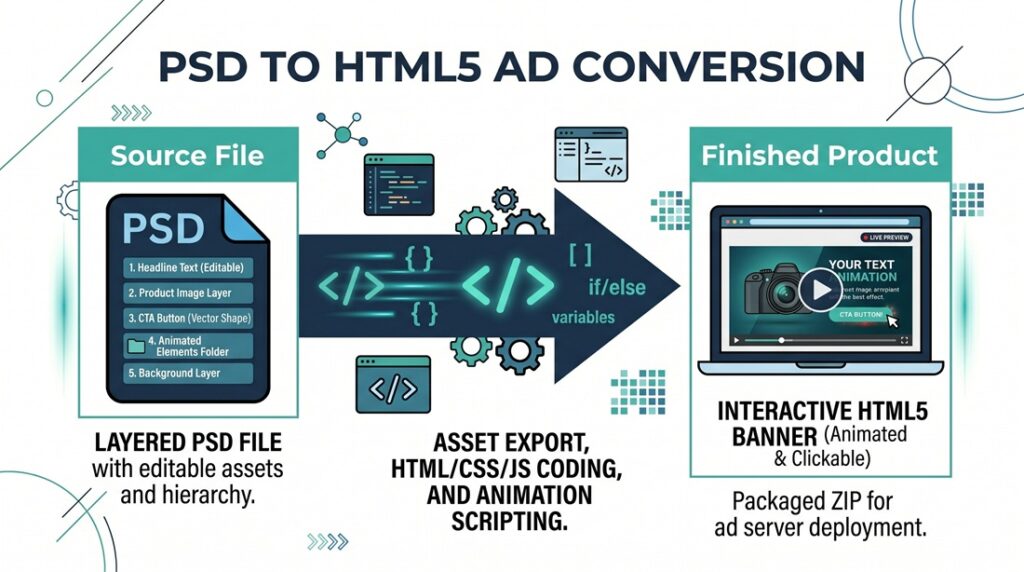
Doing this by hand for every size and version eats hours on a big campaign. That’s why we built a free tool that plays every size in Chrome, picks the finished frame and packages the files the way each platform wants. If you’d rather hand off the whole production, here’s how to outsource HTML5 banner production, and how a PSD becomes a finished HTML5 banner.
Frequently asked questions
Do I need a backup image for HTML5 ads in 2026?
For Google’s platforms it’s optional. For The Trade Desk and Amazon DSP it’s required, and most publishers still ask for one. If the campaign runs outside Google, include one for every size.
What size should a backup image be?
The same pixel size as the HTML5 ad. Most platforms cap the file at 40 KB. Amazon allows 50 KB for 300×600. Some publishers allow 60 KB.
Does the backup image go inside the ZIP?
Not for Google CM360, DV360 or The Trade Desk: upload it separately. Yahoo wants it inside the ZIP. Amazon wants the fallback built into the ad’s code.
What happens if I don’t upload a backup to CM360?
Where HTML5 can’t run, CM360 serves nothing. You lose that impression.
JPG, PNG or GIF?
JPG for photos, PNG for flat graphics and text, GIF when the destination wants animation, like email.
Sources
- Google CM360 release notes, May 16, 2022
- Google CM360: Create a display creative
- Google DV360: HTML5 creatives
- Google Ads: display ad requirements
- The Trade Desk Creative Specifications (PDF, March 2025)
- Amazon Ads technical guidelines
- Yahoo HTML5 guidelines
- LiveIntent ad specs
Looking for a banner production company?
Digitaland has produced HTML5 banners for agencies and brands for 15 years. Send us the brief and we take it from there.