If you’re building a display ad campaign, you need to know which banner sizes to use. Run the wrong sizes and your ads won’t show up where your audience is. Run too few sizes and you’re leaving reach on the table.
This guide covers every IAB standard banner size that matters in 2026 — what each one is, where it shows up, and which sizes to build first when your budget is limited. We hand-code HTML5 banners every day for agencies and brands, so this is based on what actually gets trafficked, not just what’s listed in a spec document.
What Are IAB Standard Banner Sizes?
The Interactive Advertising Bureau (IAB) is the organization that sets the rules for digital advertising. They created a set of standard ad sizes so that advertisers, publishers, and ad networks all speak the same language. When an advertiser builds a 300×250 banner, it works on any publisher site that accepts that size — no custom work needed.
The IAB updated their standards in 2017 with the “New Ad Portfolio,” which shifted focus toward flexible, ratio-based formats that work across screens. But in real-world ad buying and trafficking, fixed-pixel sizes are still what everyone uses. Publishers sell fixed ad slots. Ad servers require exact dimensions. Programmatic exchanges match inventory by size.
So while the IAB talks about flexible formats, the reality is that you still need to build specific pixel sizes to run display ads in 2026.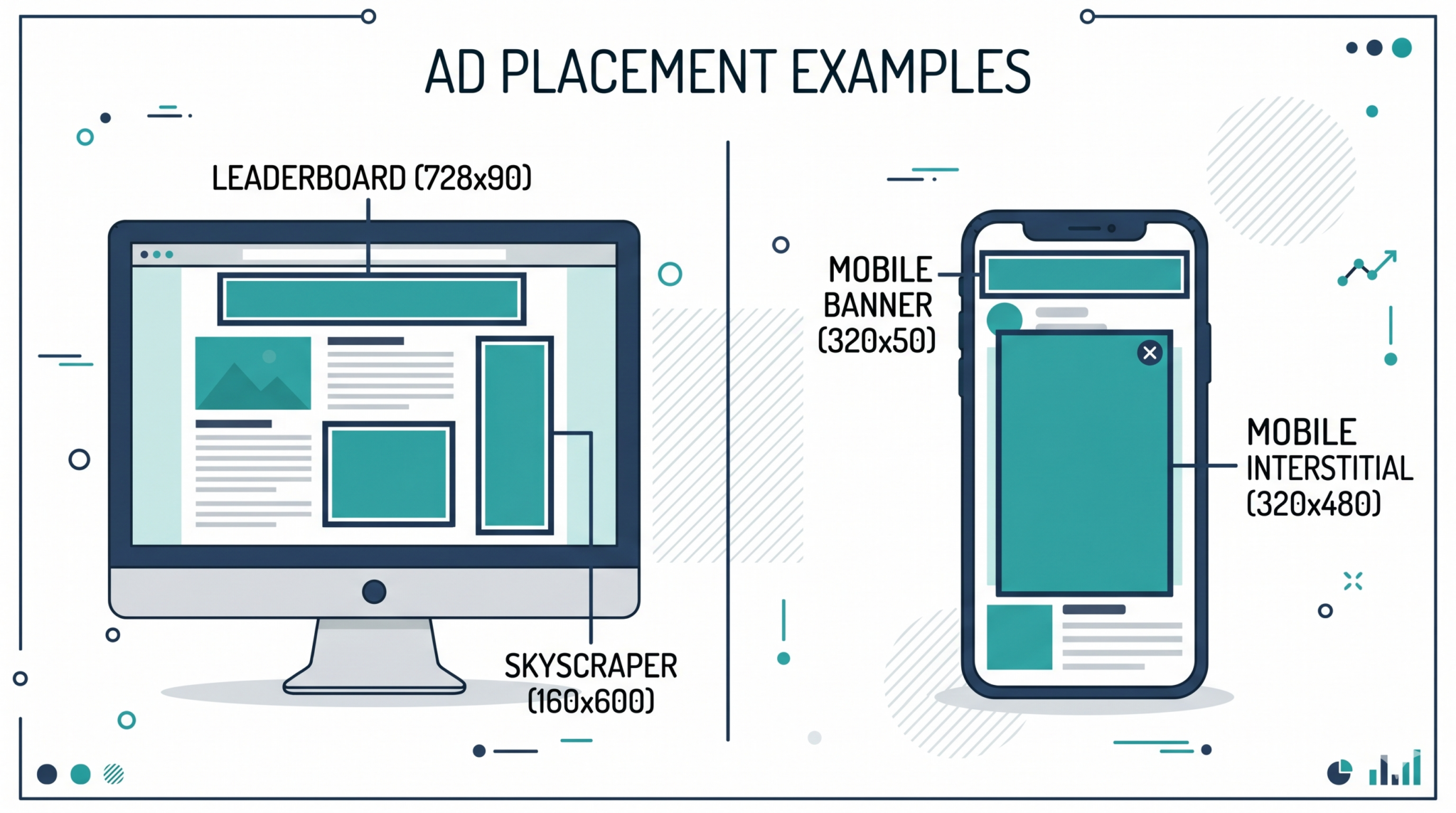
The Must-Have Sizes: Start Here
If you can only build a few sizes, these are the ones that matter most. They cover roughly 80% of available ad inventory across Google Display Network, programmatic exchanges, and direct publisher buys.
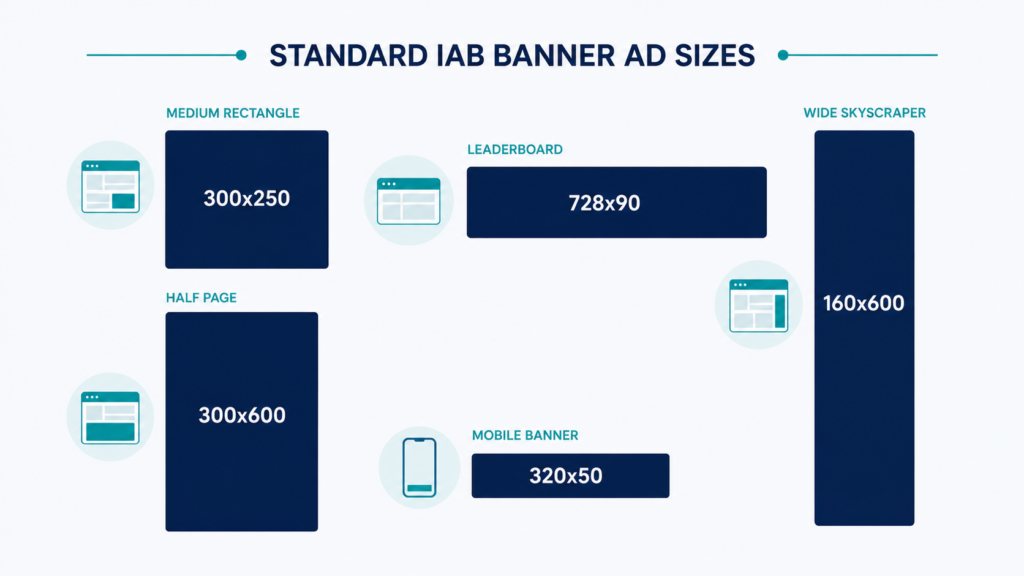
300×250 — Medium Rectangle
This is the single most important banner size in digital advertising. It works on desktop and mobile, fits in sidebars and within article content, and is accepted by every ad network on the planet. If you only build one size, build this one.
Where it shows up: in-content placements, sidebar positions, between paragraphs on article pages, mobile in-feed placements.
Why it performs well: it’s big enough to show a clear message with a product image and CTA, but small enough that publishers put it everywhere. More available inventory means more chances for your ad to be seen.
728×90 — Leaderboard
The classic header banner. It sits at the top of web pages, right below the navigation, where it’s one of the first things visitors see. High visibility, strong for brand awareness.
Where it shows up: top of page on desktop sites, above or below main navigation.
Keep in mind: this is a desktop-only size. It’s too wide for mobile screens, so you’ll need a mobile leaderboard (320×50) to cover mobile traffic.
160×600 — Wide Skyscraper
A tall, narrow banner that runs along the side of the page. It stays visible as users scroll through content, which means longer exposure time than most other formats.
Where it shows up: left or right sidebar on desktop sites, often sticky (stays in view as you scroll).
Design tip: use the vertical space to tell a story — stack your message in frames that the eye follows from top to bottom. Don’t just stretch a horizontal layout vertically.
300×600 — Half Page
This is the bigger, more impactful version of the skyscraper. It gives you a lot of canvas to work with — enough room for product images, multiple messages, or even mini-interactions in rich media formats.
Where it shows up: sidebar positions on desktop, premium publisher placements.
Why agencies love it: the larger size means higher engagement rates and better creative flexibility. Many premium publishers charge more for this placement, but the performance usually justifies the cost.
320×50 — Mobile Leaderboard
The standard mobile banner. It’s small, sits at the top or bottom of the mobile screen, and is the most common mobile ad format by far.
Where it shows up: top or bottom of mobile web pages and in-app placements, often as a sticky banner that stays on screen.
Design tip: you have very little space, so keep it to a short headline, your logo, and a CTA. No paragraphs. No tiny text. If someone can’t read your message in one glance, it’s not going to work.
High-Impact Sizes: When You Want to Stand Out
Once you’ve covered the five core sizes, these are the next ones to add for broader reach and more visual impact.
970×250 — Billboard
A wide, premium format that stretches across the full width of most desktop pages. It commands attention and gives you room for bold creative — large images, animation, even video.
Where it shows up: top of premium publisher pages, homepage takeovers.
Keep in mind: not all publishers support this size, and inventory is more limited than standard formats. But when it’s available, it performs well for brand awareness campaigns.
320×480 — Mobile Interstitial
A full-screen mobile ad that appears between content pages — for example, between levels in a game or between article pages. It’s impossible to miss, which is why it gets high engagement.
Where it shows up: in-app placements, mobile web transitions.
Keep in mind: users have to actively close the ad, so make sure the creative earns the interruption. A lazy interstitial with a generic message will annoy people, not convert them.
320×100 — Large Mobile Banner
Twice the height of the standard 320×50, this gives you more room for creative on mobile without being as intrusive as a full interstitial. It’s becoming more popular as mobile traffic grows.
Where it shows up: top or bottom of mobile web pages, in-app placements.
970×90 — Super Leaderboard
A wider version of the standard 728×90 leaderboard. It fills the full width on large desktop screens and feels more modern than the traditional leaderboard.
Where it shows up: top of desktop sites, especially on wider-layout publishers.
336×280 — Large Rectangle
A slightly bigger version of the 300×250. Google Ads supports it, and it gives you a bit more room for creative without changing the placement type. Some publishers prefer this size over the standard 300×250.
Quick Reference: All IAB Standard Sizes
Here’s every standard size you should know, grouped by where they run:
Desktop sizes: 300×250 (Medium Rectangle), 728×90 (Leaderboard), 160×600 (Wide Skyscraper), 300×600 (Half Page), 970×250 (Billboard), 970×90 (Super Leaderboard), 336×280 (Large Rectangle), 468×60 (Banner — legacy, less common now), 120×600 (Skyscraper — being replaced by 160×600)
Mobile sizes: 320×50 (Mobile Leaderboard), 320×100 (Large Mobile Banner), 300×250 (Medium Rectangle — works mobile too), 320×480 (Mobile Interstitial), 300×50 (Small Mobile Banner — less common)
Cross-device sizes: 300×250 works everywhere. It’s the only size that runs equally well on desktop, mobile, and tablet.
File Size and Technical Specs
Building the right sizes is only half the job. Your banners also need to meet technical specs or they’ll get rejected by the ad network.
Initial file load: 150KB max. This is the hard limit for Google Display Network and most programmatic exchanges. Your HTML, CSS, JavaScript, images, and fonts — everything that loads when the banner first appears — needs to stay under 150KB.
Subload (polite loading): 2MB max. After the page finishes loading, your banner can pull in additional assets — heavier images, web fonts, extra animation frames. This is called polite loading, and the limit is typically 2MB total.
Animation length: 30 seconds max. Your banner can animate for up to 30 seconds, after which it should stop on the final frame with your CTA visible. Looping is allowed on some networks but not others — check your specific ad server’s rules.
File formats: HTML5 is the standard. GIF and static JPG/PNG are still accepted everywhere but won’t perform as well as animated HTML5. Flash is dead — has been since 2020.
Backup image required. Every HTML5 banner needs a static fallback image (usually JPG or PNG) that shows if the HTML5 version can’t load. Same dimensions as the banner, under 40KB.
Click tag: Every banner needs a click tag — the code that tells the ad server where to send users when they click. The exact code depends on your ad server. Google Campaign Manager uses Enabler.exit(). Standard Google Ads uses a clickTag variable. Sizmek, Flashtalking, and Adform each have their own way of doing it. Getting this wrong is one of the most common reasons banners get rejected during trafficking.
Which Sizes to Build First (by Budget)
Tight budget (3 sizes): 300×250, 728×90, 320×50. These three cover the majority of desktop and mobile inventory. Start here.
Standard budget (5-6 sizes): Add 160×600, 300×600, and optionally 320×100 to the three above. This gives you strong coverage across all major placements.
Full coverage (8-10 sizes): Add 970×250, 970×90, 336×280, and 320×480. This maximizes your reach across premium and standard inventory. Most large agency campaigns build this many sizes.
The math is simple: more sizes = more available inventory = more impressions = lower CPM. If you’re only running 300×250 and 728×90, you’re competing for a fraction of the available ad space. Adding even two or three more sizes can noticeably improve campaign reach and lower costs.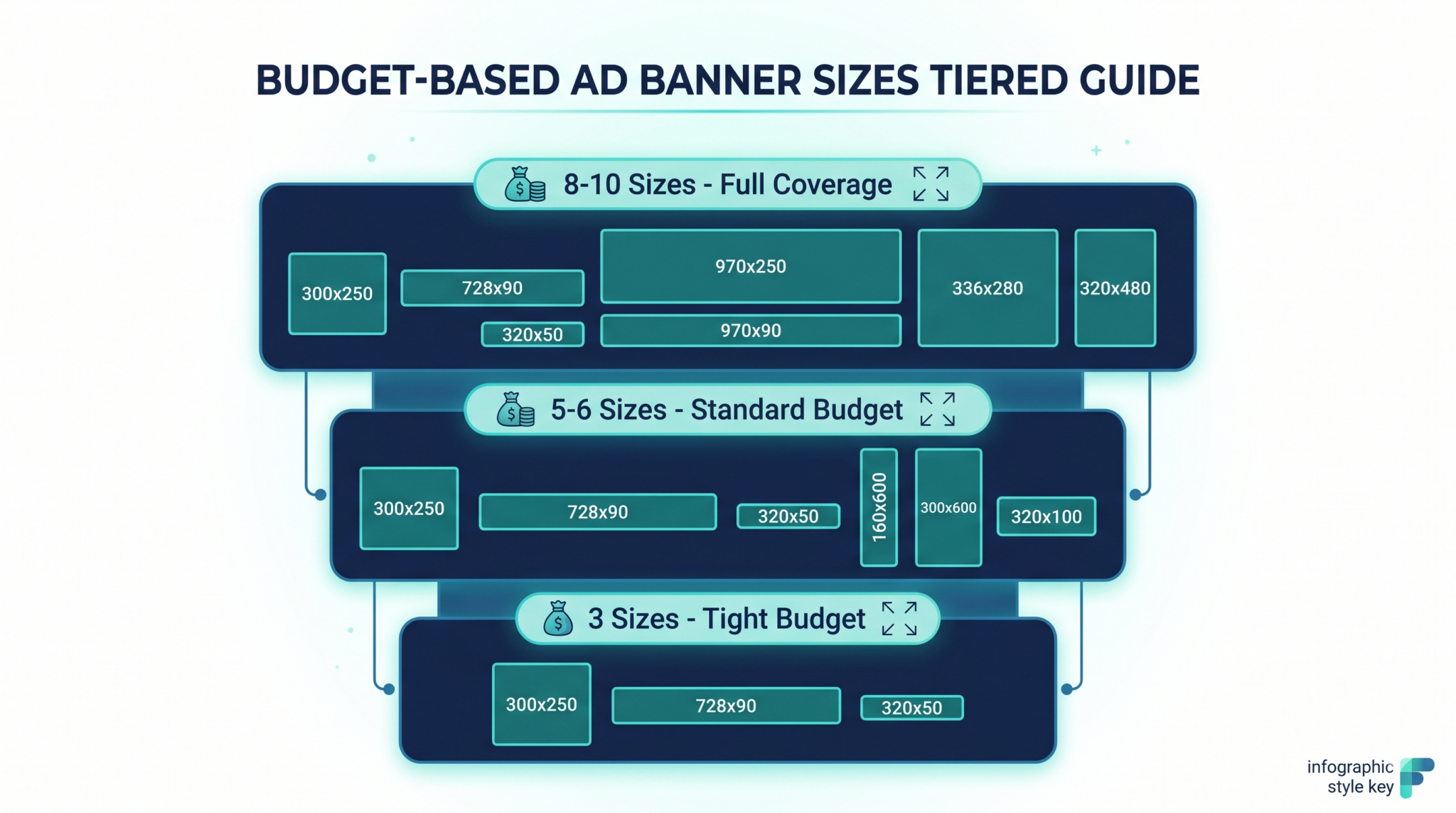
Common Mistakes to Avoid
Designing for one size and scaling the rest. Each size has its own layout challenges. A 728×90 is a thin horizontal strip — you can’t just shrink a 300×250 design into it. Each size needs to be thought through independently, even if they share the same creative concept.
Ignoring mobile sizes. Mobile traffic makes up more than half of web traffic in 2026. If you’re only building desktop sizes, you’re missing most of your audience.
Exceeding file size limits. A 200KB banner looks the same as a 140KB banner to the viewer, but the 200KB one gets rejected. Optimize your images, use CSS for solid colors and gradients instead of image files, and use lightweight animation libraries.
Forgetting the backup image. Your beautiful HTML5 animation means nothing if you don’t include a static fallback. Some environments — older browsers, certain in-app placements, low bandwidth connections — can’t run HTML5. The backup image is your safety net.
Using the wrong click tag. Every ad server handles clicks differently. Build your banners with the correct click tag for your ad server from the start. Retrofitting click tags after the fact is a pain and a common source of bugs.
The Bottom Line
The IAB standard banner sizes haven’t changed much in recent years, and that’s a good thing — it means the infrastructure is stable and your ads work everywhere. The sizes that matter most are still 300×250, 728×90, 160×600, 300×600, and 320×50. Build those five and you’re covered for most campaigns.
Where things do change is in the technical requirements: file size limits, animation rules, click tag implementations, and polite loading standards. These details are where campaigns break or succeed. Getting the sizes right is the easy part. Getting the production right is what separates professional ads from rejected ones.
Digitaland is a digital production studio that hand-codes HTML5 banner ads across all IAB standard sizes. We’ve built display campaigns for Nike, Samsung, LG, Wendy’s, and hundreds of other brands across every major ad server. Get in touch to talk about your next project.