Short answer: Rich media ads are display ads that do more than show a picture. They can expand, float, play video, run a game or react to taps, and they report on each of those interactions. Most are built in HTML5 and weigh more than a standard banner. Pick the format for the goal, keep the first load light, use MRAID for apps, and measure interaction as well as clicks.
This guide is for brand marketers, agency producers and ad ops teams who buy, plan or traffic rich media advertising. It covers what rich media is and how it differs from a standard HTML5 banner. It also covers every major format, the weight limits, how the ads are built and trafficked, mobile design, examples, metrics and what drives the cost.
- What are rich media ads?
- How rich media ads are different from standard HTML5 banners
- Rich media ad formats
- Rich media banner specs and weight limits
- How rich media ads are built and trafficked
- Mobile rich media and MRAID
- 5 tips for designing mobile rich media banners
- Rich media ads examples
- How to measure rich media advertising
- What drives the cost of rich media ads
- Rich media checklist: 7 mistakes to avoid
- Rich media ads expand, float, play video or respond to the user, and they track each action.
- Google describes a standard creative as one file of 200 KB or less. Rich media usually goes above that.
- IAB guidance keeps the first load light: 150 KB for a 300×250, with heavier assets loaded later or on tap.
- Rich media inside mobile apps needs MRAID.
- On mobile: brand visible, one idea, big buttons, animation that stops by 15 seconds.
- Judge results by interaction rate and display time, not only by click-through rate.
 Trafficking tomorrow?
Backup images that show the finished ad.
Packaged for every platform. Free.
JPGGIFMP4
Try it free
What are rich media ads?
Google’s Studio Help Center defines rich media as an ad with advanced features like video, audio or other elements that invite people to interact. Text ads sell with words. Display ads sell with pictures. Rich media ads give the audience something to do.

In practice, that means an ad that can:
- Expand to a larger size when someone taps or clicks.
- Float over the page or fill the screen.
- Play video inside the banner.
- Hold a product gallery, a quiz or a small game.
- Report on expansions, video plays and time spent, not just clicks.
Today almost all rich media is built in HTML5. If you’re new to the format itself, start with our HTML5 banner ads guide.
How rich media ads are different from standard HTML5 banners
An animated HTML5 banner and a rich media ad can look alike at first glance. The difference is in what they can do and what they track. Google draws the line like this:
| Standard creative | Rich media creative | |
|---|---|---|
| File weight | One file of 200 KB or less | Usually more than 200 KB |
| Files | A single HTML, GIF, PNG or JPG | Often several files |
| Video | No | Can contain video |
| Expansion | No | Can expand to a larger size |
| Click-throughs | Usually one | Can track several exits |
| Reporting | Impressions and clicks | Detailed interaction metrics |
| Loading | Loads with the page | Some publishers require a polite load |
A polite load waits until the publisher’s page has finished loading before the heavy parts of the ad arrive. The banner ad specs cheat sheet lists the standard limits per platform.
Rich media ad formats
Each format suits a different goal. Here are the main ones, as Google’s Studio and the IAB describe them.
| Format | What it does | Close button |
|---|---|---|
| Rich media banner | Fixed size and position on a page or in an app. Can include video and polite load. | n/a |
| Expanding | Grows beyond its first size over the page or app content, then collapses. | Required |
| Push-down | Expands and pushes the page content down instead of covering it. | Required |
| Multi-directional expanding | Detects where it sits on the page and expands toward the open side. | Required |
| Interstitial | Floats over the page, or fills the screen at app transitions such as launch, loading or a game level. | Required |
| Video | Video inside any of the formats above, or in the publisher’s video player. | Depends on format |
| 360-degree image and video | Lets people drag or tilt to look around a scene. | Depends on format |
| Game or playable | A short game, quiz or interactive challenge inside the ad. | Depends on format |
Sources: Studio creative types and the IAB New Standard Ad Unit Portfolio. The IAB requires a close button on any ad that interrupts or partly covers the content, including expansions, interstitials and adhesion banners.

Two more points matter when you plan. Banner, expanding and interstitial creatives can also be dynamic, changing content from a feed or rules. And large placements such as the 970×250 billboard and 300×600 half page are often sold as high impact ads, with or without rich features.
Rich media banner specs and weight limits
Rich media is heavier, but it can’t load everything at once. The IAB’s LEAN guidance splits an ad’s weight into three stages:
- Initial load: everything needed to show the first frame, before the page finishes loading.
- Subload: extra files that load after the page’s load event.
- User-initiated load: assets that load only after a tap, click or expansion. The IAB sets no limit here, but asks builders to keep performance in mind.
Here are the IAB’s maximum weights for common sizes, from the New Ad Portfolio:
| Ad unit | Size (px) | Initial load | Subload |
|---|---|---|---|
| Smartphone banner | 320×50, 300×50 | 50 KB | 100 KB |
| Medium rectangle | 300×250 | 150 KB | 300 KB |
| Leaderboard | 728×90 | 150 KB | 300 KB |
| Half page | 300×600 | 200 KB | 400 KB |
| Billboard | 970×250 | 250 KB | 500 KB |
| Full page portrait (9:16) | Up to 900×1600 | 300 KB | 600 KB |
The publisher’s spec always wins. The IAB calls its portfolio an industry recommendation, and not every publisher adopts it. Ad servers also set their own limits. Campaign Manager 360 caps the HTML5 ZIP at 9.5 MB and wants the polite-load image under 40 KB. Google Ads caps an HTML5 ZIP at 600 KB.
For the most common size in detail, see our 300×250 ad size guide.
How rich media ads are built and trafficked
Google’s Studio process runs from site specs to reporting. Our version, after 15 years of rich media production, looks like this:
- Collect every spec first. Each publisher and DSP on the plan, with weights, formats and close-button rules.
- Agree the build at kickoff. Formats, sizes, states (collapsed and expanded), exits and the events to track.
- Design the first frame to work alone. Many people never tap, so the collapsed state must carry the message.
- Split the weight. First frame in the initial load, animation in the subload, video and galleries on tap.
- Add tracking. Exits, expansions, video quartiles and custom counters.
- Test on real devices. Phones, tablets, browsers and app containers.
- Traffic with backups. Link the creative to its placements in the ad server and deliver a backup image for every size.
Backups still matter for rich media. If HTML5 can’t run and there’s no backup, CM360 serves nothing. The Trade Desk requires a static backup for hosted HTML5. Amazon wants the fallback built into the ad’s code. Our backup image guide covers each platform. Our free tool turns an HTML5 banner ZIP into backup images, GIFs and MP4s, so the static versions don’t eat a day of production.
Need backups for every size?
Drop the ZIP. Get the finished frame.
JPG, GIF and MP4 in minutes. Free.
JPGGIFMP4
Try it free
Mobile rich media and MRAID
On the mobile web, a rich media ad is HTML5 in a browser. Inside an app, it runs in a container provided by the app’s ad SDK. That container needs a common language.
That language is MRAID, the IAB’s Mobile Rich Media Ad Interface Definitions. Since 2011, it has let designers write a creative once and run it in any MRAID-capable app. MRAID lets ads expand, resize, use device features, handle orientation and show full-screen interstitials.
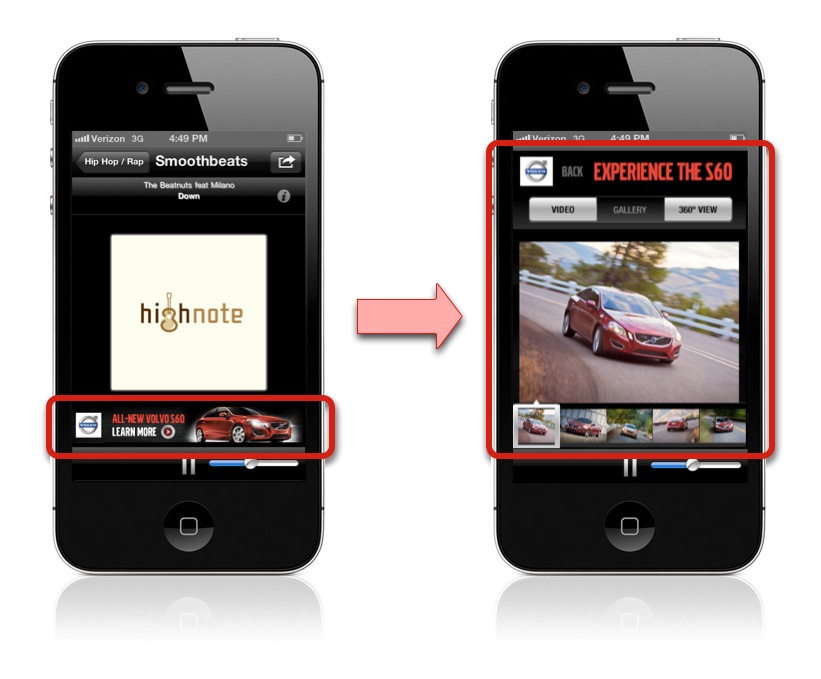
MRAID 3.0, released in July 2017, added several things ad ops teams care about:
- Viewability and audibility measurement.
- A standard close button for expanded ads and interstitials.
- A graceful exit when the ad hits an error.
- Location data, when the user and the app allow it.
- Video events built in, for consistent reporting.
Google’s Studio lists three formats that can serve inside mobile apps: banner, interstitial and expanding. An app interstitial appears at natural breaks, such as launch, video pre-roll or a game level load.
5 tips for designing mobile rich media banners
Mobile banners are small and thumbs are big. These five rules have guided our mobile banner design for years. We’ve updated them to match current IAB guidance.

- Make the brand prominent. Show the logo and brand name in every state. On a horizontal unit like a 320×50, we usually put the logo on the left and the main call to action on the right.
- Build around one idea. Show the product. Say what happens when someone taps. Use big buttons, clearly labelled, with room around them.
- Use words that invite action. “Tap to expand” or “Let’s play” pull harder than “Learn more” or “Submit”. Space is short, so every word must work.
- Make it rich, then let it rest. A short animation or a seasonal touch (snow in winter, flowers in spring) catches the eye. But the IAB says animation must not exceed 15 seconds, with no looping beyond that. Keep the call to action visible the whole time.
- Keep the flow simple. Two or three actions per screen at most. Put the key content on the first screen. Swipe galleries and video invite people in.
Three IAB rules round this out. Expansion should start with the user, not by itself. Audio starts muted, with a control to turn it on. And the close button is an “X” of at least 50×50 dp, in the top right, from the first moment.
Rich media ads examples
The best rich media examples give people a reason to stay. These projects from our own work show the main formats in action:
| Example | Format | What it shows |
|---|---|---|
| Lacoste interactive retail game banners | Game | A retail message turned into play |
| Nivea Men HTML5 game ad | Game | A brand idea built as a challenge |
| Univision Deportes World Cup games | Interactive | Content tied to a live sporting event |
| An interactive 360 ad, behind the scenes | 360-degree | How a 360 experience is planned and built |
| Nike cross-screen campaign | Cross-screen | One idea adapted across devices and countries |
Rich media doesn’t always mean one big hero ad. Volume campaigns need speed too: we produced 170 LG banners in under 2 weeks.
How to measure rich media advertising
Click-through rate misses most of what rich media does. Ad servers report on the interaction itself. These are the core Campaign Manager 360 rich media metrics:
| Metric | What it measures |
|---|---|
| Interactive impressions | Impressions where the user clicked an exit, went full-screen, expanded the ad or moused over it for at least 1 second |
| Interaction rate | Interactive impressions divided by rich media impressions. Two interactions in ten displays is 20%. |
| Average display time | How long, in seconds, the creative was on screen |
| Average interaction time | How long each interaction lasted. Interactions under 1 second are discarded. |
| Expansions | Impressions where an expanding creative was expanded, counted once per impression |
| Average expansion time | How long the creative stayed in its expanded state |
Display time and interaction time are what most teams call dwell time. One caution: CM360 counts interaction time from mouse movement. On phones there is no mouse, so judge mobile ads by expansions, taps and video plays.
What drives the cost of rich media ads
There’s no standard price, because no two builds are alike. The cost follows the work. These are the main drivers:
- Format: a rich banner is simpler than an expanding ad with two states, or a game.
- Sizes and states: each size and each expanded view is its own layout.
- Video and 3D assets: editing, compression and player work add time.
- Environments: web and in-app (MRAID) builds need separate testing.
- Versions: languages, markets and offers multiply the files.
- Tracking and QA: custom events and device testing take real hours.
If you’d rather hand the build to specialists, an HTML5 banner production company can quote from your media plan and specs.
Rich media checklist: 7 mistakes to avoid
- Auto-expanding without consent. IAB guidance says expansion must be user-initiated.
- Endless animation. Stop by 15 seconds, and pause animation when the ad is out of view.
- Sound on by default. Start muted and let people choose.
- A late or tiny close button. Show it from the start. Never force a countdown before an interstitial can be closed.
- A heavy first load. Move video and galleries to the subload or behind a tap.
- No backup image. Some platforms reject the ad. Others show nothing.
- A web-only build for an app buy. In-app placements need MRAID.
Frequently asked questions
What are rich media ads?
Rich media ads are display ads with features like video, expansion, galleries or games that invite people to interact. They also report on those interactions, not just on clicks.
How are rich media ads different from standard banners?
Google describes a standard creative as one file of 200 KB or less, with no video or expansion and usually one click-through. Rich media usually weighs more, uses several files, can expand or play video, and tracks several exits.
What is MRAID?
MRAID is the IAB’s Mobile Rich Media Ad Interface Definitions. It lets one HTML5 creative expand, resize and use device features in any app that supports it. MRAID 3.0 was released in July 2017.
How heavy can a rich media ad be?
IAB guidance allows a 150 KB initial load and a 300 KB subload for a 300×250. Assets loaded after a user taps have no IAB limit. Always check the publisher’s own spec.
How long can rich media animation run?
IAB guidance says animation must not exceed 15 seconds, with no looping beyond that. Keep the call to action visible the whole time.
Do rich media ads need a backup image?
Usually, yes. The Trade Desk requires one for hosted HTML5, and Amazon wants a fallback in the ad’s code. On CM360 it’s optional, but without one nothing serves where HTML5 can’t run.
Sources
- Google Studio Help: What is rich media?
- Google Studio Help: Creative formats that can serve in mobile apps
- IAB: MRAID 3.0 release (July 2017)
- IAB New Standard Ad Unit Portfolio (PDF)
- Google CM360: Metrics
- Google CM360: Create a display creative
- Google CM360: Image and HTML5 asset requirements
- Google Ads: display ad requirements
- The Trade Desk Creative Specifications (PDF, March 2025)
- Amazon Ads technical guidelines
Looking for a banner production company?
Digitaland has produced HTML5 banners for agencies and brands since 2011. See how we work, or send us the brief and we take it from there.